See where usage builds up
Compare projects, models and sessions. Separate new input, reused context and output.
new input · reused context · output
Claude CodeCodexLocal desktop app
Find your sessions, group them by the work you did and set a usage warning before you continue. A free desktop beta for Windows, using local records.
Free beta · Windows x64 · Desktop app · No account needed
Try grouping sessionsInvented data
Choose a piece of work, then select its sessions. Project names, times and codes below are invented; links are made by you.
One piece of workLinked by you
Whole-session usage. Each linked session is counted once in this work.
This is a simplified example. In the desktop app, find sessions by available title, project, agent, time or code and link them from session details. Roodof does not infer the topic of a conversation.
Keep related Claude Code and Codex sessions under a named piece of work. See their recorded usage and your own Useful or Wasted assessments. Set a warning for a session before continuing.
Compare projects, models and sessions. Separate new input, reused context and output.
new input · reused context · output
Set a session token or API price equivalent threshold. Roodof warns at 80% and 100% while it is running; it does not stop the agent.
Your threshold · alerts at 80% and 100%
Name your work and link the sessions yourself. Shared sessions stay visible without inflating the combined total.
Claude Code + Codex, each session counted once
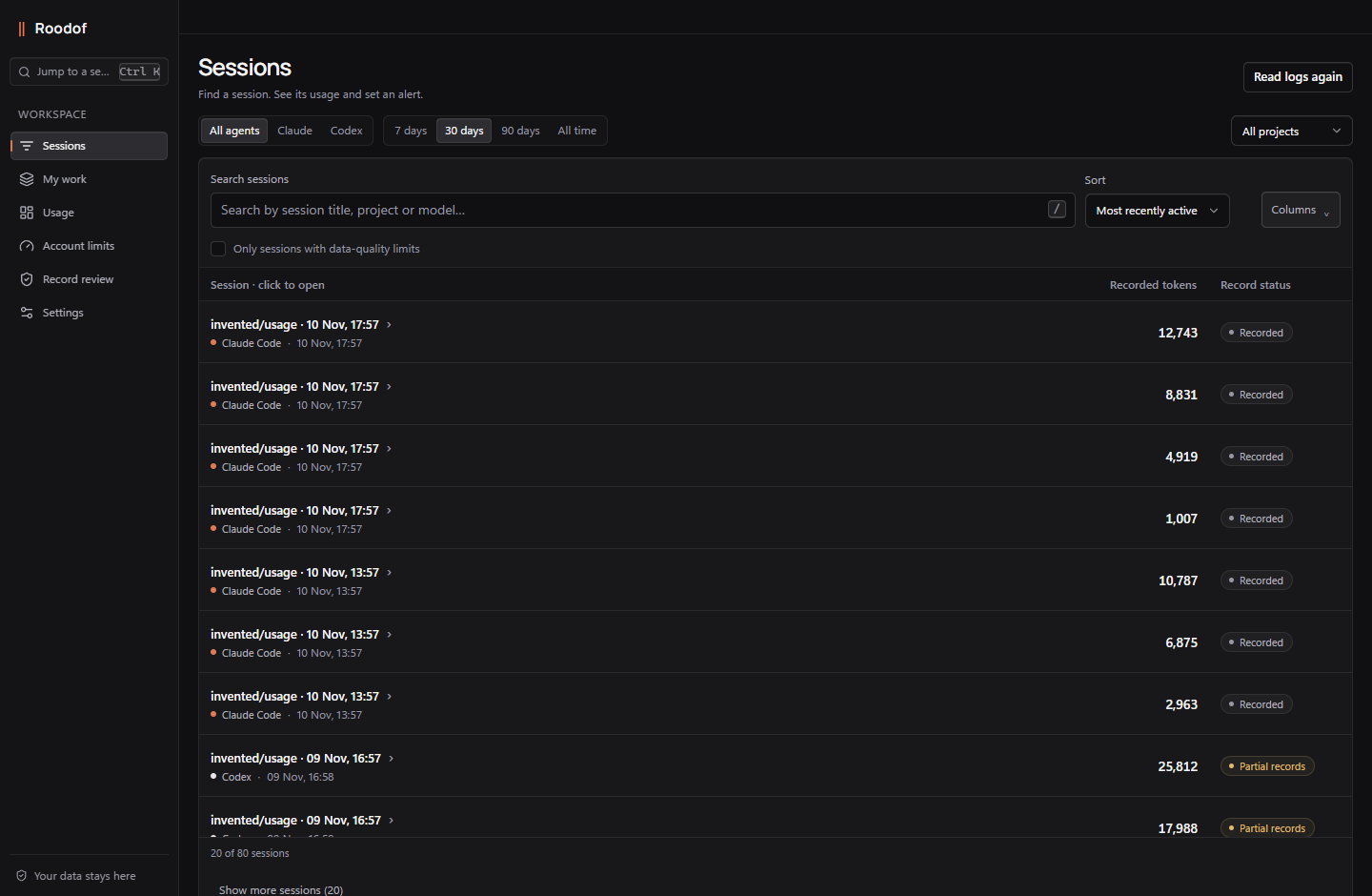
Close Roodof and run Roodof-Setup-0.9.29.exe. It installs for your user account and opens. No administrator rights or separate Python installation. Use Start or the desktop shortcut afterwards. Portable ZIP is also available.
Choose See your sessions after records are ready. Search by title, project or model; empty results offer ways to widen your filters. Use Add a log folder for another installation or an already running WSL distribution.
Link related sessions to your work and set a session usage alert. Record review holds coverage, observations and chart guidance. Language, Help and Updates are in Settings → General. Keep Roodof open for alerts; dollar figures are API price equivalents, not bills.
Result
Your first result: a named work item with linked sessions and their whole-session usage, plus an optional warning for a session you want to monitor.
Widen filters or choose Add a log folder. If no local records exist, use Claude Code or Codex first, then read again. Settings → Backup & support → Inspect read issues explains problems. ChatGPT web conversations are not included.
Roodof reads the records your agents already keep. It calls no model and sends no agent data to an external service.
Where it runsLocal
Windows desktop window. Local records are processed on your computer; the terminal/Python edition opens a browser.
Model callsNone
None. Measuring spends no tokens.
Your agent logsRead-only
Read, never changed.
Conversation textKept out
Prompts, replies and tool output are kept out of Roodof’s page and metadata archive.
Work names and linksLocal
Work names and links are saved on your computer.
NetworkNo agent data
No agent data is sent. On Windows, update checks are optional and send no agent records.
Private backupsYou choose
Private backups can contain paths and identifiers. You choose where to keep them.
Free early beta
Install once, then open Roodof from Start or the desktop shortcut. Free beta; no Roodof account. Portable ZIP and the terminal/browser edition remain optional.
Know what you are opening.Windows x64 · 169.81 MB · Installer, desktop runtime and Python included
Download Windows installerUnsigned early release. If your system shows a security warning, stop and check the release details.
Roodof-Setup-0.9.29.exeIn the portable ZIP, Roodof-Demo.cmd opens invented records.
Optional terminal/browser edition for Python 3.9+. Use the Windows installer or ZIP for the desktop app.
Download Python wheelWindows and Linux have local test evidence. Physical macOS acceptance is still pending.
python -m pip install pler-0.9.29-py3-none-any.whlThen run roodof
Roodof is an independent tool for individual developers, not an official Anthropic or OpenAI product. This beta is a personal local app, not a shared team service.
Questions about the release? Contact plersolutions1st@gmail.com
In PowerShell, in the folder where you saved the installer:
PS>
Expected
The app reads agent logs on your computer. It retains usage metadata, work names and links locally; it does not send agent data to an external service. Private backups can include paths and identifiers.
Close Roodof to stop the app and monitoring. Remove an installed copy from Windows Settings → Apps; saved history is kept unless you explicitly choose to delete it. For the portable edition remove its extracted folder. Keep a private backup. Remove an enabled Claude status-line integration first; see Help.
Questions or feedback?
plersolutions1st@gmail.comRoodof reads local agent logs to extract usage metadata. Prompts, replies, commands and tool output are not shown or retained in its metadata archive. Optional Git observations read file content in memory; only counts are kept.
No. API list-price equivalents are comparison figures for recorded usage, not subscription charges or a provider bill. Unknown pricing and incomplete histories have limits. Do not change a subscription based on this beta’s plan suggestions alone.
A session usage alert is a threshold you choose: Roodof warns at 80% and 100% while running, monitoring up to 20 selected sessions roughly every 10 seconds. It does not stop the agent. Provider quotas are separate dated local observations; Claude Code requires the optional status line. No provider account is queried.
It includes the whole usage of the sessions you link. Roodof does not divide a session between tasks. A session can belong to several work items; the combined summary counts it once.
The beta is free. No payment, subscription signup or Roodof account is required. Any future paid offering will be announced separately.
Yes. Regular JSON exports can hide project names but are not anonymous; private work names and links are omitted. Private backups include retained history and work links, may contain paths and identifiers, and are unencrypted. Recovery creates a new folder.
No. The example uses invented records in your browser and never opens agent folders. This site has no analytics or report-upload feature. Hosting infrastructure still handles ordinary web requests. The language is chosen through separate English and Turkish links, not a tracking cookie.
Write to plersolutions1st@gmail.com. Your Roodof version, operating system and the step where you got stuck are enough.